
Windows 10 Workstation Lifetime What is it? A Deep Dive
Learn everything about Windows 10 Workstation Lifetime, its advanced computing capabilities, ReFS support, and how it empowers professionals to handle extreme workloads seamlessly.
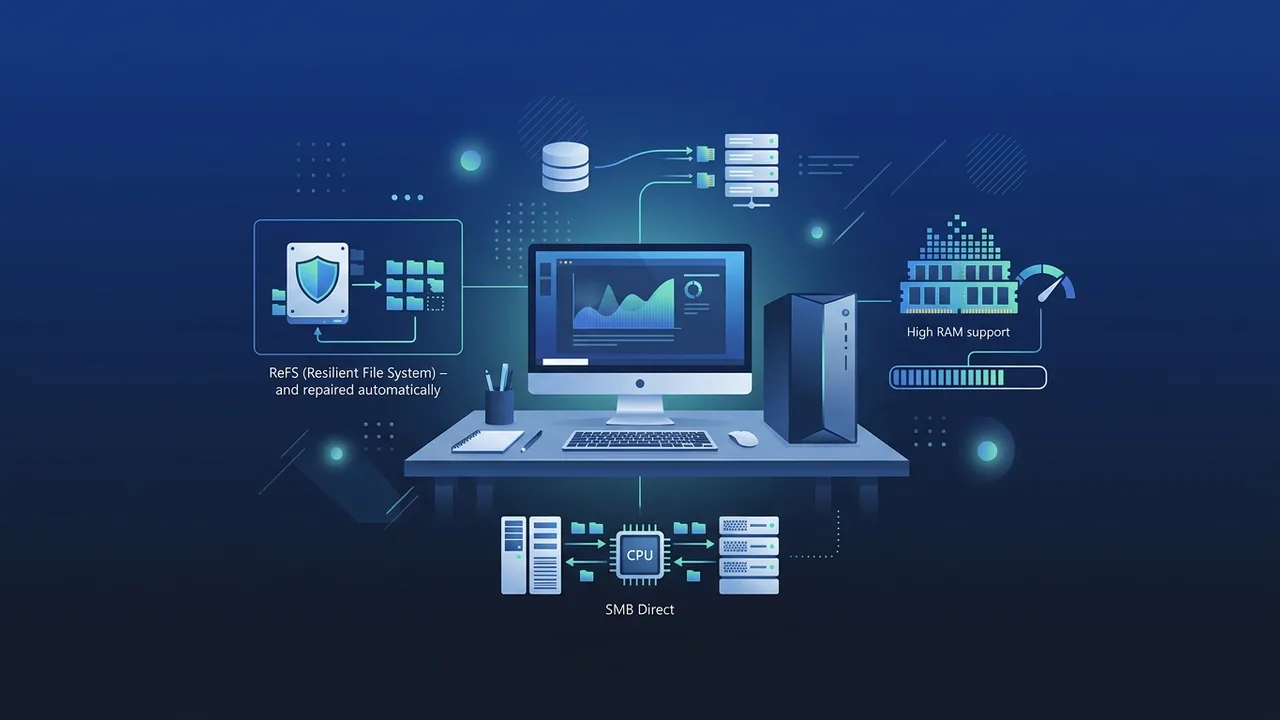
Overview of Windows 10 Workstation Lifetime
The operating system known as Windows 10 Workstation Lifetime is Microsoft's premium edition designed specifically for power users, developers, and enterprises that demand high-performance computing. It is engineered to handle intensive workloads on advanced workstations and multi-processor server-grade hardware. Whether you are running complex simulations, processing massive data sciences, rendering heavy 3D graphics, or editing high-resolution video, this system offers the robustness and stability required to maintain peak productivity.
The term "Lifetime" indicates a perpetual licensing model. This means that once you purchase and activate your product key, the license remains active permanently on your machine without requiring monthly or annual subscription fees. It ensures your operating system continuously receives crucial security patches, feature updates, and performance improvements directly from Microsoft servers, preserving your system security and stability over time.
Key Features
What sets Windows 10 Workstation Lifetime apart from standard Home or Professional editions is its capability to leverage server-grade hardware configurations and advanced file management systems. Here are the core features:
1. Resilient File System (ReFS)
ReFS is built for cloud-scale storage and extreme resilience. It automatically detects and repairs data corruption on mirrored storage spaces, ensuring that your valuable business projects and heavy datasets remain intact and protected from silent data corruption.
2. Persistent Memory Support (NVDIMM-N)
By utilizing non-volatile memory modules, the operating system enables you to read and write files with the fastest speed possible. Your files remain accessible even when the computer is shut down or experiences a sudden power loss, blending the speed of RAM with the permanent storage of a solid-state drive.
3. High-Speed File Sharing with SMB Direct
For businesses working with network-attached storage, SMB Direct leverages network adapters with Remote Direct Memory Access (RDMA) capability. This allows high-throughput, low-latency file transfers with minimal CPU usage, freeing up system resources for other heavy computational tasks.
4. Superior Hardware Support
Standard Windows versions limit your hardware potential, but this edition supports up to 4 physical CPUs and up to 6TB of RAM. This massive scale makes it the perfect foundation for virtual machine configurations, deep learning research, and industrial-grade software applications.
How to Use
Setting up and optimizing your operating system requires a few essential steps to ensure you are unlocking the full potential of your workstation hardware:
Step 1: Verify Hardware and Compatibility
Before installing, ensure your hardware components match the scale of this operating system. While it runs smoothly on standard systems, its advanced features are best experienced on devices powered by multiple Intel Xeon or AMD Threadripper processors and equipped with high-speed SSD configurations.
Step 2: Activation and License Application
You can perform a clean installation by downloading the official ISO from Microsoft. Once installed, navigate to your activation settings and enter your genuine digital product key. Since it is a lifetime license, it binds to your device motherboard, allowing you to easily reinstall the operating system if you upgrade your storage drive in the future.
Step 3: Enable Ultimate Performance Mode
To eliminate any micro-latencies, open the power configuration settings and activate the unique "Ultimate Performance" power scheme. This setting removes energy-saving throttles to deliver maximum hardware response time during heavy tasks like 3D rendering or high-volume compiling.
Common Questions
For users evaluating their upgrade path, here are answers to common inquiries about this workstation edition:
- How is this edition different from the standard Windows 10 Pro? The main differences lie in advanced hardware capacity (supporting 4 CPUs instead of 2, and 6TB of RAM instead of 2TB) alongside exclusive enterprise features like ReFS, NVDIMM-N, and SMB Direct network protocols.
- Does the lifetime license expire or require renewals? No, a lifetime digital license is a one-time purchase. It does not contain hidden renewal costs and remains active on your designated system for the lifespan of the hardware.
- Can I upgrade from Pro to Workstation directly? Yes, you can transition smoothly by typing in your valid Workstation key under the change product key option in the activation menu, without needing a full system reinstallation.
Important Tips
To secure a safe, optimal, and uninterrupted experience while using this professional operating system, keep the following guidelines in mind:
- Avoid cracked or unofficial activation tools: Using unauthorized software cracks to activate your system exposes your sensitive business documents to malware and severe security risks, while blocking your system from downloading critical Microsoft security updates.
- Keep drivers up to date: To leverage specialized hardware features like RDMA and persistent memory, always obtain the latest stable drivers directly from your hardware manufacturer's support page.
- Acquire genuine licenses: Ensure you buy your activation key from reputable digital distributors. Genuine licensing guarantees total compatibility with future updates and provides peace of mind for your daily business operations.
Conclusion
For organizations, engineers, and creatives who push their computer hardware to the absolute limit, having an operating system designed for extreme workloads is vital. Choosing a genuine, permanent license ensures your critical workstations operate with unmatched stability, supreme speed, and complete security.
You can get a genuine Windows 10 Workstation Lifetime license from ABMKeys at a competitive price with instant WhatsApp delivery.
Frequently Asked Questions
What is Windows 10 Workstation Lifetime?
What is the benefit of the ReFS file system in this edition?
How many processors does Windows 10 Workstation support?
How do I upgrade from Windows 10 Pro to the Workstation edition?
You can get a genuine license from ABMKeys at a competitive price with instant WhatsApp delivery.
Buy Now